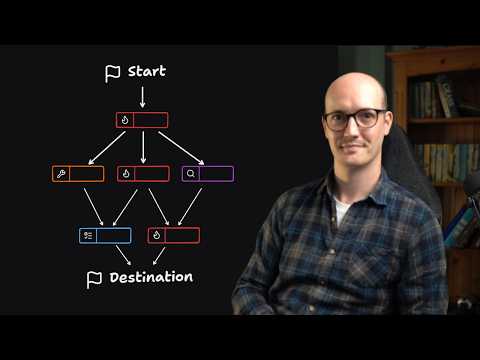
Key ideas
- Some work is too big for one agent session, and you know that before you start, so plan it across many sessions instead of cutting it down to fit.
- Name the destination first. It sets the scope every later decision is measured against.
- Split what's left into decisions you can state now, which become tickets, and fog, the questions you can't phrase yet.
- Each ticket gets its own session. Closing one clears some fog and moves the frontier of what can be decided next.
- Prototypes are what stop a big plan turning into waterfall, because they show you something real while you're still deciding.
- A cleared map isn't a build plan. Turn it into a spec, then into implementation tickets, and the spec links back to every decision behind it.
Matt Pocock’s answer to work that’s too big for one agent session is to stop planning it in one. Wayfinder, a skill in his public skills repo, charts the work as a map in your issue tracker: a destination you name first, decision tickets you can work now, and fog for the questions you can’t phrase yet. Each ticket gets its own session, and resolving one clears some fog and moves the frontier. These are my notes on his 15-minute video, with the four ticket types and where the map goes once it’s clear.
Why one session isn’t enough
His usual planning tool is grilling: the agent interviews him until the plan is clear, then the result goes into a spec. That still works, but it lives inside one session, and some work is bigger than what fits in a context window, let alone the part of it where the model works best. He says he’d been chopping big work into small bites ahead of time, then hitting a question nobody could answer yet, while watching his token budget the whole time. The real cost, as he puts it, was that he’d started shaping what he built to fit the agent.
Wayfinder takes the opposite approach. You admit up front that you can’t see the whole route, and you plan in a way that expects that.
The map
You start by naming the destination. In his main example it was a buildable spec for a command palette in his course video manager app, with an icon picker, a search across diagrams and copying from them. Wayfinder explores the repo, grills you about what done looks like, and then charts the map.
The map is a parent issue in your tracker, with each decision as a sub-issue. He uses GitHub, but the skill doesn’t depend on it: a setup skill in the same repo, setup-matt-pocock-skills, configures it for Linear, Jira, GitLab or local markdown. A decision lives in its own ticket, and once it’s resolved, a one-line version is written back to the map. The map is an index, so a new session can read it quickly and only open the tickets it needs.
The map also keeps a list of what’s still fog. In his command palette example the first chart had seven tickets, and three of them could be worked straight away.
Four ticket types
Each ticket has a type, and the type is a label in the tracker.
| Type | Use it when | Who does it |
|---|---|---|
| Grilling | A decision can be settled by talking it through. This is the default. | You and the agent together |
| Prototype | You need to see or try something before you can decide | You and the agent, building something small to look at |
| Research | A decision is blocked on a fact from outside the repo | The agent alone, in a subagent, often started as soon as the map is charted |
| Task | Something has to be done before a decision can be made, such as setting up access or contacting someone | The agent where it can, otherwise a checklist for you |
He spends the most time on prototypes. The objection he hears is that this much planning looks like waterfall. His answer is that a prototype is a high-fidelity way to get feedback while you’re still planning, so the plan keeps meeting something real.
Working the frontier
Tickets block each other, because some decisions only make sense once others are made. The tracker’s blocking links show which tickets are open and unblocked, and that set is the frontier.
To work it, you call Wayfinder again with one ticket’s name or link, in a new session. He uses a handoff skill that writes the prompt and starts a subagent for him, but it comes to the same thing. You resolve the ticket, then look at what opened up. Much of the work is that loop: close a ticket, see where the frontier moved, take the next one. One of his maps had 14 of 17 tickets done and still hadn’t built the skill it was planning around, because several decisions depended on seeing that skill work first.
From map to spec
A finished map is dense, so he doesn’t build straight from it. He runs his to-spec skill on the map to get one spec, which he says came out too long for GitHub’s character limit on the first try, then to-tickets to slice it into implementation tickets, then implements each one and reviews the code at the end. Wayfinder takes the place grill-with-docs used to hold in that pipeline.
He says the spec is better now because every part of it links back to the decision ticket it came from. An agent that’s unsure about something can read the original discussion instead of trusting a summary of it.
He also treats the spec as temporary. It’s the destination for one multi-session job. Once the code exists he closes the issue that held the spec and rarely looks at it again, where spec-driven development keeps a spec alive and edits it as the code changes.
When to use it
Only when the route is foggy and the work spans sessions. If you can plan something in one session, or you already know the way, a single grilling session is cheaper and better. He’s also used Wayfinder outside software: planning courses, and building a garden office, with site surveys, finding builders and the research in between all as tickets.
If you want to try it:
- Ask first whether the work fits one session. If it does, grill it instead.
- Write the destination down before any ticket exists, and decide what the map ends in: a spec, a decision or a finished task.
- Keep each open ticket phrased as a question. One that reads “build the X” belongs after the map, not on it.
- Work one ticket per session, and look at the frontier after each one closes.
- Reach for a prototype whenever talking hasn’t settled a question.
Key terms
- Destination
- Where the whole map ends: usually a spec to build from, but it can be a decision, a proof of concept or a real-world outcome.
- Map
- One parent issue in the tracker that indexes every decision ticket with a one-line summary and a link.
- Decision ticket
- A child issue that asks one question. Its answer is a decision, not a piece of the build.
- Frontier
- The open tickets nothing else is blocking, which you can take right now.
- Fog of war
- Decisions you can tell are coming but can't yet phrase sharply. They become tickets once earlier ones are resolved.
- Grilling
- A session where the agent interviews you, one question at a time, until a decision is settled.
Quotes from the talk
You have to clear the fog of war.
The prototypes are the way that you prevent it from becoming waterfall.