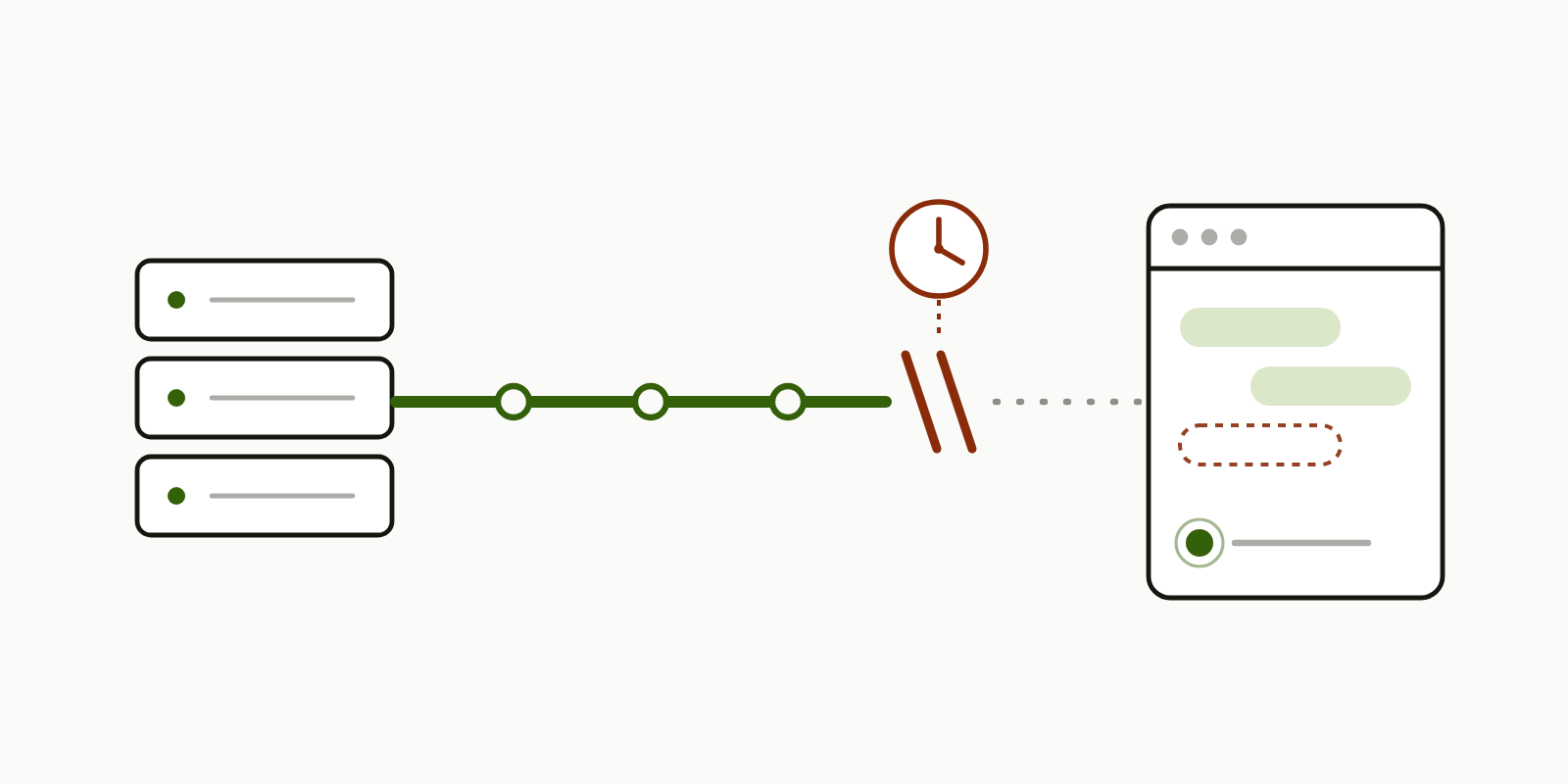
A live chat in a web app I work on lost a message. Someone sent a file, the other person never saw it, and a reload made it appear. Every theory pointed at attachments. The logs pointed somewhere else: the three streaming connections behind that chat had each ended after exactly 301 seconds, minutes before that message was sent, and not one had been reopened. Every message sent after that went to a connection that looked healthy and was listening to nothing.
The stream is Server-Sent Events, or SSE: a one-way channel where the browser opens one long HTTP request and the server writes events down it whenever there’s something new. The app runs on Google Cloud Run. If you run SSE on Cloud Run, or on anything with a request or idle timeout in front of it (an AWS Application Load Balancer idles a connection out after 60 seconds by default; nginx has proxy_read_timeout), this is worth ten minutes, because the failure has no error attached and the standard advice for keeping streams alive doesn’t cover it.
The symptom, and the theory it sends you chasing
The report was specific: a message carrying a file didn’t arrive, two text messages before it had, and a page reload showed the file. That shape points hard at the file. Something in the upload, the file check, or the drawing of a message that has a file and no text must be dropping it.
Nothing on the server’s publish path treats a message with a file differently from one without. Three server tests written for this fix, one per message shape (file only, file and text, text only), passed against the unfixed code: the server was already publishing file-only messages correctly. Two places that draw messages did handle a file-only one badly, and both got fixed along the way, but a drawing bug doesn’t make a message appear on reload. The file was innocent. What made it look guilty was timing: it happened to be the first message sent after the connections had died.
So the symptom to recognise is this. Live updates stop arriving, nothing errors in the console or the server logs, and a reload fixes it. Whatever was sent first after the silence began will look like the cause, and it isn’t.
Reading the connection lifetimes out of the logs
I put a Claude Code session on the service logs for that conversation. This is what they showed (times Pacific, September 7, 2026, measured from the dev service, the copy the team tests on, where the report came from):
| Time | What happened |
|---|---|
| 21:35:02, 21:36:22, 21:36:38 | Three stream connections opened: one person’s view, the other person’s view, and the first person’s view again after joining the chat |
| 21:36:55, 21:37:33 | Two text messages sent. Both arrived live. The connections were up. |
| 21:40:03, 21:41:23, 21:41:39 | All three connections ended, each after exactly 301 seconds |
| No further connection was opened, for the rest of the conversation | |
| 21:47:10 | The message with the file was sent. The server returned 200. Nothing was listening. |
| 21:47:24 | Page reload. The message appeared. |
The diagnostic move is the third row. Three connections opened at different times all ended after the same number of seconds. 301 is what the request log recorded: the configured 300, plus the second it took to close. A bug in the chat code wouldn’t line up three unrelated connections on one number. A configured limit would. Once you see a lifetime that matches a configured timeout, the question changes from “what’s wrong with this feature” to “what cuts every stream at that length, and why doesn’t the page notice”.
If you suspect this on your own service, that’s the first thing to pull: the duration of each streaming request in the request log, sorted. A cluster at one value is the signature.
Why 301 seconds: the request timeout applies to streams too
Cloud Run gives every request a timeout. The default is 300 seconds and the maximum is 3600, and when a request reaches it the platform ends the response (Cloud Run request timeout docs). The docs don’t single out streaming, but a streamed response is still a request, and the logs above show it being treated as one. It doesn’t get an exemption for being long-lived on purpose, so a stream that has been open for five minutes gets cut whether or not anything is wrong with it.
The dev service was configured at 300 seconds, which is where the 301 came from. Raising it is a real option and the production service is configured at 3600, but read that for what it is: production has the hourly form of the same fault. It moves the cut to a time when fewer people are watching. It doesn’t remove it. The stream has to survive being cut, because it will be.
That’s the first half of the mechanism, and on its own it’s fine. Browsers expect streams to close. The EventSource object that handles SSE in the browser is specified to reconnect automatically when the connection drops (MDN, using server-sent events), and this app’s server also sends the last fifty messages of the conversation whenever a stream opens. A clean cut every five minutes should have cost nothing but a brief reconnect.
Why the browser did not reconnect, and why the fix must not care
It didn’t reconnect. No new connection appeared in the server log for the rest of the conversation, which means the app’s own reconnect handler, which runs on EventSource’s error event, never ran. I have no browser-side trace: nobody had the console open when it happened. So I can’t tell you whether the error event never fired and readyState (the property that says whether the object is connecting, open, or closed) sat at open the whole time, or whether it fired and the reconnect attempt hung somewhere nothing acted on. Either way, the page carried on as if it were connected, and it wasn’t.
I never established why. It’s tempting to write a paragraph about proxies holding TCP sessions open after the upstream has gone, and that’s a known way to get a zombie connection, but I didn’t prove that here and I’m not going to claim it. What I can say is that the error event on EventSource is a bare event with no status and no reason even when it does fire (that’s the spec, not something the MDN page spells out), so a diagnosis that depends on it was always going to be thin.
That shaped the fix. Anything that waits for the browser to report the failure is not a fix, because in this case the browser either didn’t report it or reported it where nothing acted. The client has to be able to decide for itself that the stream is dead, from evidence it can see, on its own timer. If your browser does reconnect and you still lose messages, you have only the other half of this problem: skip to the fourth question at the end.
The keep-alive the browser never sees
The standard advice for long-lived SSE is to send a keep-alive so intermediaries don’t close an idle connection, and the standard form is a comment line: a line starting with a colon, which the SSE format defines as something the client ignores. The blank line after it is what ends a frame, one event’s worth of lines, so it’s part of the message.
: heartbeat
This app was already sending exactly that every 25 seconds. It’s good advice as far as it goes, and it does keep proxies from timing out an idle stream. The trap is in the word “ignores”. A comment line never reaches your code. EventSource has no callback for it. So from the page’s point of view a stream that is receiving a heartbeat every 25 seconds and a stream that was cut six minutes ago are identical: both are silent. The keep-alive was doing its job for the proxies and giving the client nothing it could use.
The change on the server is small. The keep-alive becomes a named event:
event: ping
data: {}
That’s a 22-byte frame instead of a 13-byte comment, on each stream, every 25 seconds. Now the page can register a listener for ping and treat each one as proof of life. A named event only reaches code that asked for it by name (unnamed events go to the message listener), so browser clients that never registered for ping ignore it. Not everything reads the stream through EventSource, though: one consumer that parses the raw stream by hand, a desktop bridge, forwarded every named event and had to learn to drop this one, which review caught. The test that pins the server change asserts that the stream contains event: ping, and it failed on the old code.
The watchdog: 70 seconds of silence, then throw the connection away
The client side is a watchdog per stream. It records the time of the last thing it received, ping or real event. Every ten seconds it checks that timestamp. If nothing has arrived for 70 seconds, a little under three ping intervals, it closes the EventSource itself and opens a new one.
This only works once the server sends something the page can see. Add the watchdog to a stream that still sends comment-line heartbeats and it will tear down a healthy idle connection every 70 seconds. The two halves ship together.
Stripped to its shape:
const LIVENESS_TIMEOUT_MS = 70_000;
const CHECK_INTERVAL_MS = 10_000;

function watchStream(open: () => EventSource) {
  let source = open();
  let lastActivityAt = Date.now();
  const noteActivity = () => { lastActivityAt = Date.now(); };

  // Alongside the app's own listeners, not instead of them.
  // Add every named event your server sends, or a busy stream looks silent.
  const attach = () => {
    source.addEventListener("message", noteActivity);
    source.addEventListener("ping", noteActivity);
  };
  attach();

  const timer = setInterval(() => {
    if (document.hidden) { noteActivity(); return; }
    if (Date.now() - lastActivityAt < LIVENESS_TIMEOUT_MS) return;
    source.close();
    source = open();
    attach();
  }, CHECK_INTERVAL_MS);

  return () => { clearInterval(timer); source.close(); };
}
Three details in there are worth keeping. The listeners are added with addEventListener, so they sit beside whatever the app already does with a message rather than replacing it. The function hands back a stop function, because a watchdog that outlives its stream keeps reopening a connection nobody wants. And the hidden-tab branch exists because this app deliberately drops its stream when the tab is hidden and reopens it on visibilitychange; without it, the watchdog and that behaviour fight. It also resets the clock, so a stream that died while the tab was hidden gets a further 70 seconds after the tab comes back. That’s fine here, because the reopen on visibility covers it. If your app keeps its stream open in a hidden tab, don’t copy that branch.
The reopen is only half of it. What brings the lost message back is what happens on open: in this app, the server sends the last fifty messages of the conversation to every new stream, so a reopen carries whatever was missed. That’s this app’s behaviour, not the protocol’s, and it has a limit: fifty messages covers a five-minute gap in a chat, and an hour-long gap on the production timeout in a busy conversation could exceed it. Closing an EventSource and creating a new one also throws away the browser’s own resume marker, the Last-Event-ID header it would have sent on an automatic reconnect, so a replay that relies on that header has to carry its own cursor instead.
The numbers, 70 and 25, are this app’s. They were chosen so a slow network can’t be mistaken for a dead stream and a person waiting on a reply notices nothing. They’re a starting point, not a standard.
Making reconnects routine broke two things, both caught in review of the change rather than in its first draft. The chat used to mark a message as read every time the stream delivered it, and a replay delivers up to fifty at once, so every reconnect could fire up to fifty pointless read receipts. Now each message is marked once, the first time it’s seen. And a second client of the same backend had a watchdog that could only fire once: its “am I still the live connection?” check compared against a variable that the reconnect itself cleared, so after the first reopen it never fired again. The check now keys on the timer the watchdog owns, so it stays armed across reopens.
The tests were run against the unfixed code first: twelve failed across five suites, seven of them for the stream itself (four in the browser, three on the server), and all passed with the fix. Two gaps the review at merge named, and I’ll pass on: the web client’s watchdog isn’t tested for firing a second time, and the second client can start two reconnects at once during an outage. What tests can’t stand in for at all is two real accounts on the deployed service; that check is a manual one.
A ten-minute check for your own stream
Four questions, for any long-lived streamed response you run behind a platform or proxy with a timeout:
- What cuts it, and how often? Find the request timeout, the idle timeout, and the load balancer’s own limit. Pull the durations of your streaming requests from the log and look for a cluster at one of those values.
- Can the client see the keep-alive? If it’s an SSE comment line, the page can’t. Make it a named event, or any frame your client code actually receives. WebSocket has the same blind spot: the browser answers ping frames itself, and your code never sees them.
- What notices silence? Not the
errorevent. A timer on the client that compares the last-received time against a threshold, and closes and reopens the connection itself when it’s exceeded. - What happens after a reopen? The reconnect has to replay or refetch whatever was sent while the stream was dead, or you’ve fixed the connection and still lost the message. Know where the replay comes from, what its cap is, and whether it survives a manual reopen that drops
Last-Event-ID. And check what else fires on every delivery, because it’s about to fire on every replay.
If a message ever goes missing and shows up on reload, start at question one. It probably wasn’t the message.